
Inside a Custom Claude AI Setup For a Photography Studio
What I Actually Handed a Client: A Real Claude AI Setup
I recently walked a photography studio client through her new Claude setup — an AI setup for a photography studio, built specifically around her voice, her seasons, her actual business — live, screen-share and all. Apologizing for how slow it was loading. Catching myself mid-sentence. Sounding exactly like someone talking a friend through her own computer, because that’s what it was. I’m telling you this because it’s the most normal, unglamorous version of “handing someone AI” you’ll ever see — no slick launch, just me going “okay wait, let me just show you this part” over and over.
The short version: the difference between a client opening ChatGPT, Claude, or Gemini cold and a client opening a skill I built for her isn’t the model. It’s that mine already knows her seasons, her session types, her voice, and what she’s tried before — so instead of explaining her whole business every time she wants a newsletter, she just says “let’s go” and it starts asking her the right questions.
Table of Contents
The before: a blank window that doesn’t know anything about you
Okay, here’s the thing people get wrong about “just use AI for your marketing.” These tools do have memory now. Memory built up from you casually chatting is nothing like a project someone actually sat down and built for your business on purpose. One is picking things up in passing. The other is someone (me, in this case) sitting with your seasonal calendar, your session types, your actual voice, and your last six months of client conversations, and turning all of it into something the tool can pull from before you’ve typed a word.
So yes, it’ll remember you mentioned wedding season last week. It won’t know your flower farm sessions come back every June unless someone put that in on purpose. That’s the biggest difference, I’d say — not memory versus no memory, strategy versus no strategy.
So the output you get back is stock. Fine, on a good day. But it could’ve been written for any studio in any city, because the tool doesn’t know a single specific thing about your studio — and specific is the entire game in a market that’s already drowning in cheesy, soft-focus stock language.
The newsletter skill: watching it already know things
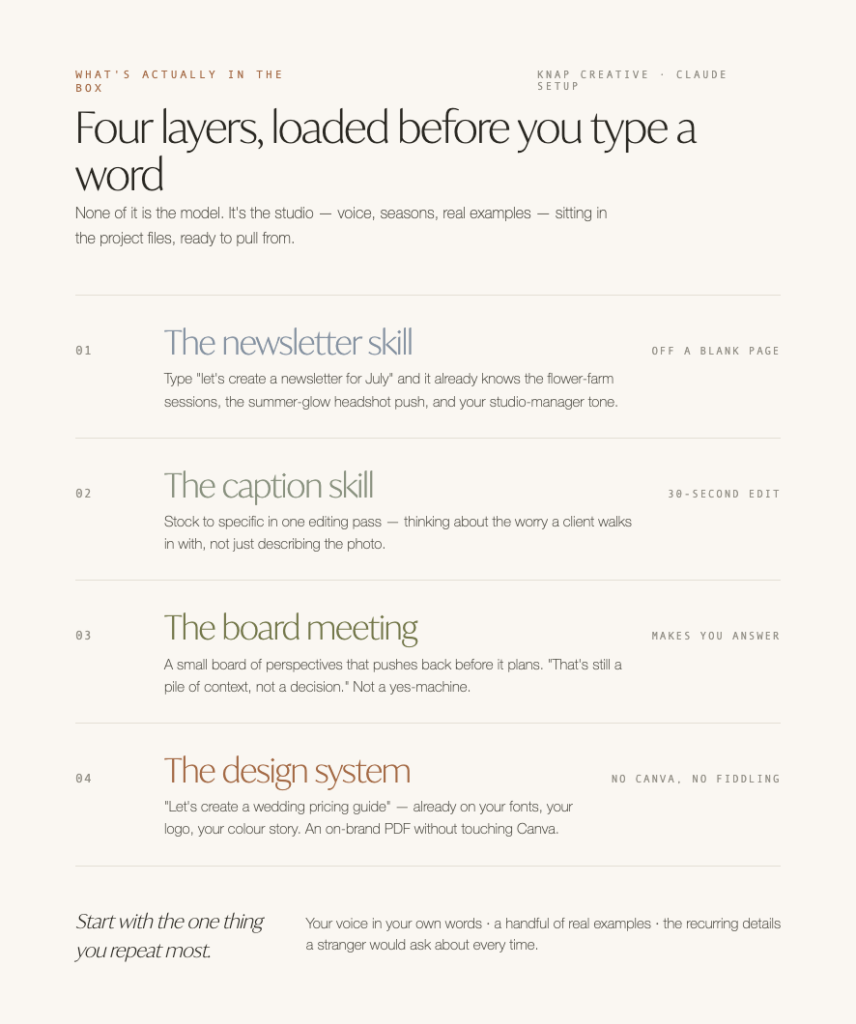
In the demo, all I typed was “let’s create a newsletter for July.” That’s it. No details, no brief, the laziest possible input on purpose — I wanted to show her the floor, not the ceiling.
And it came back already knowing the flower farm sessions come back every summer, that headshots get a push in the “summer glow” window, that the tone should read like her studio manager — professional, but warm — not like a corporate newsletter.
It handed her a full draft, ten subject lines, ten preview text options, and a built-in reminder to mention the business side of things too (I told the skill never to let the family content crowd out the money-making stuff entirely — it’s supposed to nudge both, every time).
She didn’t build any of that. It was already sitting in the project files and the skill before she ever opened the chat. The orientation happened months ago, once, so she’s not doing it every single time — though we do go back in and refresh the project at least once a year, since her business isn’t static and neither should the context be.
The caption skill: from stock to specific in one editing pass
In the demo, I ran a fake example live — pulled a random photo, pretended it was a headshot client who needed something for a magazine feature, and answered the skill’s quick brief questions. Here’s what it actually pulled out:
One of our recent clients came in for a headshot she needed for a magazine feature, half-convinced the whole session was going to hinge on her hair not cooperating. It didn’t come up once — that kind of thing almost never does. What people worry about walking into a session isn’t usually what ends up mattering in the photos.
We’re booking headshot sessions now, with a few spots left this month. Magazine deadline, website refresh, or that LinkedIn photo you’ve been avoiding for two years — same process, same result either way. [studio location] Link in bio to grab a spot.
Not perfect. I still wouldn’t post it exactly as-is. But it’s closer than anything a blank prompt hands you — it’s already thinking about the actual worry someone has walking into a session, not just describing the photo.
So I did what she’ll do every time: read it out loud, cut or tighten the parts that didn’t sound like a real photographer talking about a real client, and kept moving. The skill gets you off a blank page and most of the way there, you spend thirty seconds making it sound like you instead of like AI, and you’re done.
The gap between draft one and something postable shrinks every time you use it, because it’s learning what you keep and what you cut.
The board meeting: “still a pile of context, not a decision”
This is the one I’m most proud of, and it’s the one nobody else has built for a photography studio. I put a small board of perspectives into her setup — different angles on profitability, brand fit, what her ideal client actually wants — and when she tries to build something like a new wedding package, the board doesn’t just spit out a plan.
In the demo, I said “let’s build some new wedding packages,” and before it brought a single seat into the room, it came back with: that’s still a pile of context, not a decision — what’s the actual work here? That’s the whole point of the thing. It’s not a yes-machine. It’s not going to hand her four bullet points and call it strategy. It’s going to make her answer the question underneath the question first.
(I wrote a whole separate post on how I built this kind of setup for myself, if you want the full mechanics of the board itself — How to Get AI to Actually Push Back on You, Instead of Just Agreeing.)
The design system: a pricing guide without touching Canva
The part I almost didn’t build. I’d never handed a client a design system before her — it’s the newest layer of this, and it’s the one I’m still figuring out edges on. But the use case sold itself the second I typed “let’s create a wedding pricing guide” and watched it come back already knowing her fonts, her logo files, her color story, without me feeding it a single one of those details in that chat.
Pricing guides are a Nightmare to build by hand, and it still looks like garbage after you’ve fiddled with it for 19 hours. Every update means opening Canva, hunting down the right file, re-aligning six text boxes because someone nudged one half a pixel in 2019. This skips that entirely — she asks for a new guide, tweaks it in plain language (“make this feel more like the summer collection, less formal”), and exports it as a PDF that’s already on-brand.
(I wrote a whole separate post on how I build a design system, if you want to get into it — it’s so cool. Exactly How to Set Up AI Design So It Works For You.)
What to build if you’re doing this yourself
You don’t need a studio’s worth of skills to get the version of this that matters. Start with the one thing you repeat most — for a photographer, that’s probably captions or newsletters — and build a single project with:
- Your actual voice, in your own words, not a style guide written about you
- A handful of real examples of things you’ve written that sound like you
- The specific, recurring details a stranger would have to ask about every time (your session types, your seasons, your actual client language)
FAQ
What’s the actual difference between a custom Claude setup and just opening ChatGPT?
A custom setup already has your business loaded into it — your voice, your seasons, your session types, real examples of things you’ve written — so it can ask you the right questions instead of you re-explaining your business every time. A blank chatbot window has none of that context unless you build it in on purpose.
Do these AI tools have memory now? Doesn’t that solve the problem?
Yes, they have memory, and no, it doesn’t solve this. Memory picked up from casual chatting is nothing like a project someone deliberately built around your business. One happens by accident over time; the other is there from message one.
Do I need to be technical to use something like this?
No. Once a setup is built, using it is just typing what you want in plain language — “let’s create a newsletter for July” is a real, complete prompt. The setup work happens once, ahead of time.
Does the setup ever need to be updated?
Yes — we go back in and refresh the project at least once a year, since a business changes and the context should keep up with it.
What’s the “board meeting” part?
A set of specific perspectives built into the setup that a client can call on for real decisions — pricing, new packages, brand fit — that pushes back and asks questions instead of just agreeing. The mechanics are in a separate post if you want the full build.
Is this only useful for photographers?
No — the photography studio is the example here, but the same setup (voice, recurring details, real examples, a board to push back) works for any service business that repeats the same kinds of content on a schedule.
Liked this? I send a short email every couple of weeks — a real story plus one useful thing about your website or marketing, never longer than your coffee. Come hang out.
Want your own version of this? That’s what Claude Setup is.
Doreen is the founder of Knap Creative, a website design and AI setup studio for service-based businesses. She built the setup in this post for a real client, and still isn’t sure whether “AI setup” or “assistants” sounds less like sci-fi on a sales call.